
Hi, I’m Sam.
Building my own apps is how I learn what designing with AI can really do. I make the ones I wish existed and ones for real people with real problems, and I get to own every part of the experience (for better or for worse). Explore a few below.
 Beacon
 Notebook
 Kindred
 Margin
 Braille
 Spark
Beacon
Beacon turns everything I save into reading, agent tasks and a library I can search
- An AI-assisted Mac app, in active development, in two halves: Triage for bookmarks and starred repos, Library for pictures.
- Every save ends at Pass, Read or Do. Triage passes the noise, sends the reading to Readwise Reader, and turns a Do into a brief for Claude Code or Codex that runs only after I press Enter.
- Library began as Mosaic. It finds pictures by meaning and by visual similarity.
- More about Beacon →
Every save needs a project and a next step, or a reason to let it go.
Notebook
Notebook tells me who’s waiting on a reply, so the people I care about don’t drift
- A private personal CRM for Mac and iPhone, in development.
- On the Mac it builds each relationship’s story from my Contacts, Messages, Calendar and Gmail, and draws everyone as a character.
- Replies shows the people waiting on you, one card at a time, and each card leaves toward your choice.
- The notebook is one file on my own device, and the reply check runs on Apple’s on-device model.
- More about Notebook →
Small on-device models judge one message far better than they track who owes whom. So the model only says what the last message does, and fixed rules say whose turn that makes it.
Kindred
Kindred gives two people one shared list for groceries, chores and plans
- An iPhone app any two people can share. Type anything into the orange + and it works out whether you meant groceries, a to-do with a day, a chore, dinner, a plan or a nudge.
- Tap “I’m on it” on a chore and the other phone shows you’ve got it, so nobody does the recycling twice.
- It runs on both phones and the Apple Watch, with widgets and iMessage cards. It syncs through iCloud with no server of its own, and has no analytics, ads or tracking.
- More about Kindred → How it’s made →
A check is saved as “done” rather than as a flip, so a late tap from the Apple Watch can’t undo the other person’s check.
Margin
Margin turns your feedback into your AI’s style guide
- A markdown reader for macOS: highlight in five colours and write margin notes.
- It turns writing corrections into reusable AI instructions.
- A custom evaluation harness tests each change and rejects regressions.
- Download Margin for Apple Silicon Macs →
- More about Margin →
AI keeps getting better at writing, but it still can’t write like me, and there’s no easy way to capture my voice and keep my feedback. In Margin, feedback I give once gets generalized and reused instead of lost.
Braille
Braille reads papers aloud and waits for questions
- An iOS prototype: a voice-first AI research tool for blind and low-vision experts, built for a retired cardiologist losing his sight.
- Spoken navigation through scientific papers, with answers grounded in the source text.
- Interrupt to ask what something means; it returns to the exact sentence.
- More about Braille →
A retired cardiologist used to read his specialty journals himself, and he is losing his sight.
Spark
Every open loop in my life, one decision at a time
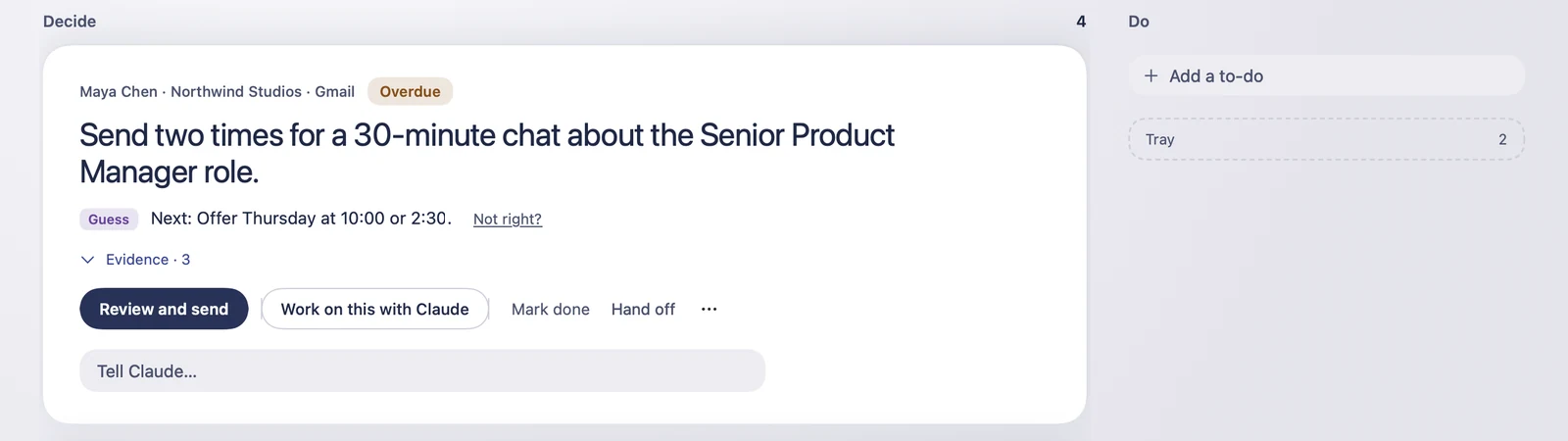
- A few times a day Claude reads my mail, messages, calendar and meeting notes and lists the replies, bills and promises I owe. Spark shows them one card at a time. Agents can do the prep, and nothing sends until I confirm the exact words.
- More about Spark →